
I don't know if its too late, but let me say this, “Apple Safari 4 is cool”. I recently downloaded it when I discovered my recent love for everything and anything from Apple. But since I am in no condition of buying any Apple product, I thought of why not to get your hands on something which is free and at the same time Apple (rare combination!)
Apple Safari has a very distinct feel compared to other browsers like Internet Explorer, Firefox or
Opera. Apple is known for its superior design and appearance in all of their products, and this one's up the mark too. The way your web pages load and appear is quite different from other browsers and it is simply a refreshing experience. Even the thumbnail preview of history pages is neatly stacked pretty much in the iPhone style. Just like the 'Speed Dial' in Opera, Safari too has got 'Top Sites' which lets you keep a collection of your favorite pages neatly arranged with their thumbnails. As you go on using Safari, it automatically identifies the websites most frequently visited by you and puts them in the Top sites list. You can of course manually put other sites in it too.
It supports tabbed browsing, which has now become a standard feature almost all major browsers. Tabs tend to reduce a little portion of the viewable area, but still Safari manages to provide a larger viewable area thanks to the absence of those space eating menu bars, title bars and what-not-bar! I agree that Safari may seem a little weird to those who are accustomed to using Internet Explorer. But with time, they get used to it, and probably do not think of returning back to Internet Explorer.
There are however some problems which prevent me from using Safari as my default browser. Opera is still my favorite browser. The first reason is that while browsing, it takes a considerable time to return to the previously viewed page. That is, you have to wait for some time for the page to load after you hit the back button of the browser. Opera does not make you wait too long to view the previous page. In fact it shows the page instantly as you click the Back button. Maybe this is because it caches the content of the web pages in some different way, I don't know, it is an altogether different topic. I don't know if I can call this a problem but every browser that I have used other than Opera suffers from this wait-to-view-the-previous-page disease. Users with fast Internet connections do not complain about this, but for us dialup folks(Yeah, I am still on dialup!) hitting the back button in Internet Explorer, Firefox, Safari and even Chrome is a painful affair.
The other reason being the slightly longer time it takes to get started. But it does not matter much because you don't start a browser too often, you just do it once and then you browse with it.
And yes, Apple calls it the world's fastest browser, but I found Opera faster than Safari.


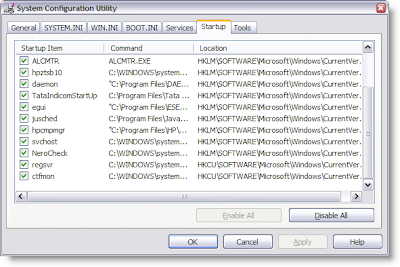 3.Uncheck the ones that you do not need.


